Purpose:
Guide operators on how to update or correct the Max Bet and Default Bet settings for their brand or partner account.
Steps to Change Max Bet
- Log in to your Big Daddy Back Office.
- Navigate to:
Configs → Partners → Edit (select your partner) - Locate the section “Bet Configurations (EUR cents)”.
- To adjust the Max Bet, first review your Max Risk Exposure setting under:
Configs → Partners → Edit → Max Win- Increasing or decreasing your Max Risk Exposure will automatically adjust the Max Bet limit.
- Example: If you set Max Risk Exposure = 100,000, your Max Bet will scale accordingly.
- Click Save to apply the changes.
Steps to Change Default Bet
- From the same Partner Edit page, scroll to Bet Configurations (EUR cents).
- Update the value in the Default Bet field as required.
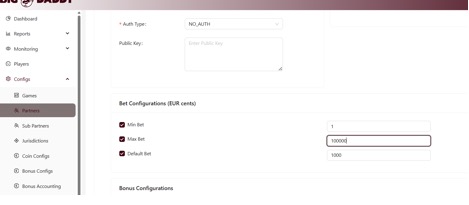
- Click Save once done.
Important Notes:
- The Default Bet cannot exceed the Max Bet value.
- Always verify your jurisdiction limits before applying new bet sizes.
If values appear locked or non-editable, contact Big Daddy Support for configuration a
Was this article helpful?
That’s Great!
Thank you for your feedback
Sorry! We couldn't be helpful
Thank you for your feedback
Feedback sent
We appreciate your effort and will try to fix the article