Purpose
To troubleshoot when casino games are not visible or active in your dashboard.
Steps
List all games that are not shown as live or active.
Path:
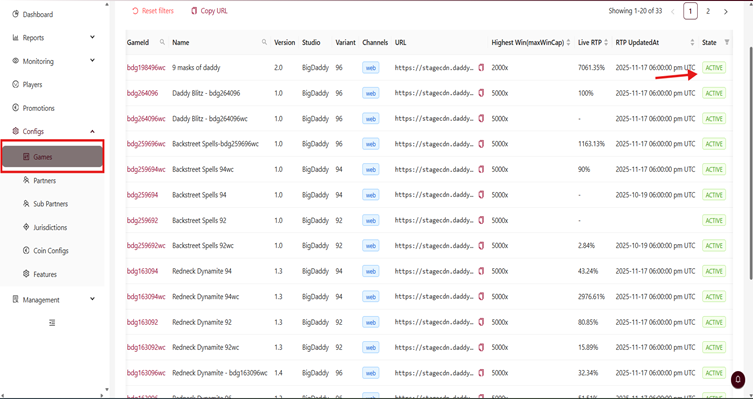
1. Login to BO→Configs → Games
2. Identify Games That Are Not Active
From the State column:
ACTIVE → Game is enabled
INACTIVE → Game is disabled
DEACTIVE → Game is deactivated and not visible on partner side
3. Use filters to quickly check inactive or deactivated games.
4. Activate a Game (If Required)
If a game is showing INACTIVE or DEACTIVE, verify:
Partner assignment
Approval status
Variant selected
RTP configuration
5. If you need a different RTP to be activated:
➡️ Write to BDG Support / Account Manager with:
Game name
Game ID
Required RTP variant
6. If not resolved. Please share below information to Big Daddy Technical Support (support@bigdaddy-gaming.com).
Missing Game names/IDs
Screenshot of the game lobby
Your organization details
Was this article helpful?
That’s Great!
Thank you for your feedback
Sorry! We couldn't be helpful
Thank you for your feedback
Feedback sent
We appreciate your effort and will try to fix the article